RIT did a lip dub of Survivor’s classic Eye of the Tiger earlier this year. I knew about it when they did it, but I had never seen the video until I came across an old email today.
My Little Corner of the Net
Generate Accessors and Mutators Automatically with PDT
I’ve been using PDT, the PHP Development Tools IDE that’s built on top of Eclipse, for my PHP development for a few years now. I came to appreciate the power and flexibility of Eclipse as a Java IDE, so it only made sense to use PDT for my PHP coding.
One thing that’s always frustrated me about PDT, however, is that there is no way to auto-generate accessors and mutators (also called getters and setters) in classes. I do a lot of Active Record style database interactions, with classes that have lots of properties, and I always find it frustrating to write all of the get*() and set*() functions by hand.
I recently discovered the PHP Source Plugin for PDT, which does exactly what I want. With a simple menu click, I get a dialog box that lists all of my class’ properties. With a couple more clicks, I can specify wich of those properties should have accessors and/or mutators, and then the plugin g creates the code. All I have to do is go in and add validation code and PHPDOC comments, and I can move on to the next class. This is going to be a HUGE time saver.
PHP Source Plugin in published by E-surf. The fastest way to install it is to use their Eclipse update site, which is available at http://pdt.plugins.e-surf.pl/updates.
HTTP Post vs. HTTP Get
I am currently involved, for the second time in the past few months, in interviewing for a new web programmer/analyst to join my team at work. Given that we are a web applications shop, several of our technical questions revolve around web protocols.
I’ve now spoken with, between the two positions, around a dozen applicants. One question that I always ask is “what is the difference between an HTTP Post and an HTTP Get and why would you use one verses the other?”
I’ve spoken with people who have anywhere from a few years experience in web technologies all the way up to senior-level folks who have been doing “web stuff” longer than me. Everyone gets the first part of the question correct, at least to some degree. Everyone knows that parameters are sent to the server in the URL string with “get” and that they aren’t with “post” (some people have described how the values are sent in the body of the request with post and some have used phrases like “some other way” to describe the process). Most people also mention that “gets” are cachable and “posts” are not and a few have commented on the fact that “gets” are length-limited and can only contain character data whereas “posts” can contain other types of data (via MIME-encoding) and do not have size limitations.
Not one applicant, however has answered the second part of the question–the “why.” So, as a public service to anyone who may get asked this question in an interview some day (or anyone who wants to make himself a better web developer in the job he already does) I am providing the answer I am seeking:
Get is used to retrieve information from the server, post is used to modify data on the server.
That’s really all there is to it: if you are adding, deleting, or modifying data, you should be using “post.” If you are retrieving existing data and not doing anything destructive to it, then you should use “get.”
If you really want to impress me, you’ll go a little more in-depth:
- “Post” should be used for any requests that should only be submitted once. Since the data isn’t cached, the request should, theoretically, never be sent twice. This is important to protect against duplicate submisions and overwritten changes.
- “Get” should be used on search forms.When searching for something, I want my back button to work so I can return to a previous location easily when my search doesn’t pan out as I’d expect.
- “Post” should be used on data-entry forms. When I’m entering a new order, student record, or blog post, I want to be sure I don’t accidently submit a duplicate when I hit the back button.
Also, whatever you do, please do not say that “post” is more secure than “get” if you want me to take you serious. Neither method does any sort of encryption or even obfuscation on the data, so neither provides any level of security. If you want to make sure an onlooker can’t access the data as it moves over the wire, use HTTPS. If you want to make sure the user of your site can’t access the data, don’t put it on your site.
University Websites
Situational humor is funny because it is true. While it points out our flaws, the humor comes from the fact that there is often little, if anything we can do to change the situation. All we can do is laugh and move on.
In the IT world, one of the best sources for such humor is the web comic XKCD. It is brutally honest in the flaws of the industry, flaws that can only see change from the hand of slow-moving committees and out-of-touch upper management.
XKCD hit it out of the park again with their recent University Websites comic. Featuring a Venn diagram, the strip compares everything on the typical university homepage with everything that people want to see, with the only overlap being the full name of the university.
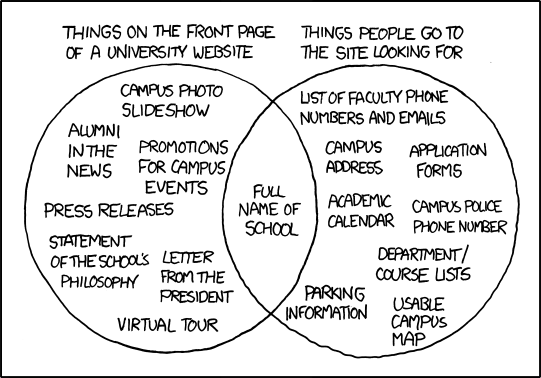
As the webmaster of a university, this gave me a good laugh because it is true. Our site features a prominent Flash carousel highlighting news of campus events, alumni stories, and (months after hockey season ended) the fact that we made our debut in both the Division I NCAA tournament and the Frozen Four last season. Yet, if i want to find someone’s phone number I have to go to a URL I always get wrong (though I did add a redirect some time ago) and download a PDF.
The problem with universities, unlike businesses, is the fact that our sites have to serve many demographics. Businesses have a set of products or services they provide and their demographic is the consumers of those services. This is true in higher ed as well: we sell the service of educating people for well-paying jobs and as such it would seem our demographic would be students. But even among students we have very different needs: prospective students want to know about the courses they’ll take and how well the balance of fun versus boring-time-spent-in-class works in their favor, while current students want to know the date they can register for their next quarter classes and the location of a campus store selling ice cream at 11:00 at night.
It doesn’t end their, either. The university homepage needs to appeal to parents (who want to know how big of a second mortgage they’ll need to pay the tuition bills), alumni (who we want to give us money so that we can attract more students by decreasing the size of the aforementioned second mortgage), wealthy benefactors (who give us lots of money to really help decrease the size of the second mortgages in exchange for having their name plastered on the front of a building), and businesses (who will license our research to make exciting products and services that we can then brag about on our homepage, making us look good to those prospective students that are the consumers of our services.
Of course, the other issue is that everyone in the university community also wants their soapbox. Professors want to entice students to take their courses, clubs want students to partake in their activities, and researchers want the world to know how they are about to change everything. All of this does have a place as it all contributes to our mission of educating people to find well-paying jobs. Its just trying to manage it all that’s a problem.
Now if I could just figure out where I can get some ice cream later tonight.